Plugin License Management
The behavior of the VTE plugin license management varies depending on the installation status and the validity of the current license.
First Installation
When the plugin is installed for the first time, or when no valid license is available, the system requires the user to enter a license key in order to enable the module’s features.
License Entry Screen
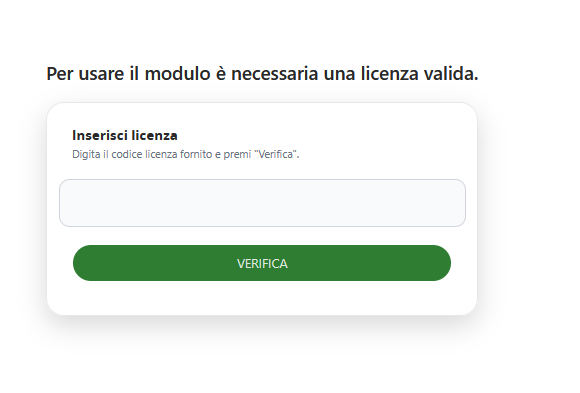
The system displays a dedicated screen with the following elements:
-
Information message: “A valid license is required to use this module”
-
Input field: Text area for entering the license key
-
Instructions: “Enter the provided license key and click ‘Verify’”
-
VERIFY button: Validates the entered license key
Verification Process
-
Enter the license key in the designated field
-
Click the green VERIFY button
-
The system automatically validates the key
-
If the key is valid, the plugin is activated
-
If the key is invalid, an error message is displayed
Existing Installation with License
When the plugin is already installed and a license is present (whether valid or expired), the interface provides advanced license management options through dedicated buttons available on the homepage.

“Update License” Button
-
Location: Visible in the top bar of the homepage (Version 1.0)
-
Function: Allows the user to enter a new license key or update the existing one
-
Use case: Required when the current license has expired or when switching to a different license
License Update Window
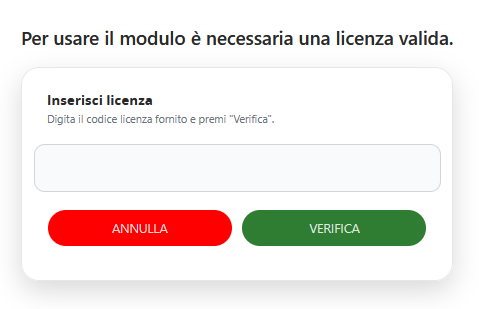
When the user clicks Update License, the system displays a modal window with the following elements:
-
Information message: “A valid license is required to use this module”
-
Insert License section: Dedicated area for entering the new license key
-
Text field: For entering the provided license code
-
Instructions: “Enter the provided license key and click ‘Verify’”
-
CANCEL button: Closes the window without making changes
-
VERIFY button: Validates the newly entered license key
The system automatically detects the license status and, in case of an error or expired license, displays an error message.