# Configuring Microsoft 365
For Microsoft 365 / Exchange Online, select **Office365** as the Exchange version.
If the Mail Server field is empty, the connector normally proposes `outlook.office365.com`.
## Network requirement for Microsoft Graph
**vtenext must be reachable by Microsoft servers**
With Microsoft 365/Graph, the connector uses push notifications to receive events and changes from Microsoft. The public vtenext endpoint used by the connector must therefore be reachable over the Internet by Microsoft servers. If Microsoft cannot reach the endpoint, standard inbound event handling does not work correctly.
Before going live, verify that the vtenext instance is published correctly over HTTPS and that firewalls, reverse proxies or other security systems do not block Microsoft from reaching the connector endpoint.
**Installations not reachable from the Internet**
A periodic cron-based synchronization can technically be configured manually instead of push notifications. This is **strongly discouraged**, is not the standard connector architecture and is not available as a self-service configuration: it requires a specific custom setup.
## Choosing the connection method
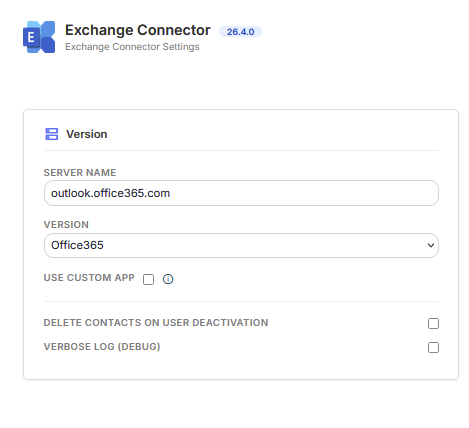
**vtenext Proxy**
This is the simplest option when the customer does not want to configure and manage a Microsoft application directly in their own tenant. It does not require manually entering Tenant ID, Client ID or Client Secret. Each user still completes their own Microsoft login through **Connect**.
[](https://manual.vtenext.ch/uploads/images/gallery/2026-09/ZgyIOCS7Bu61BoUZ-immagine.png)
### Custom Microsoft App
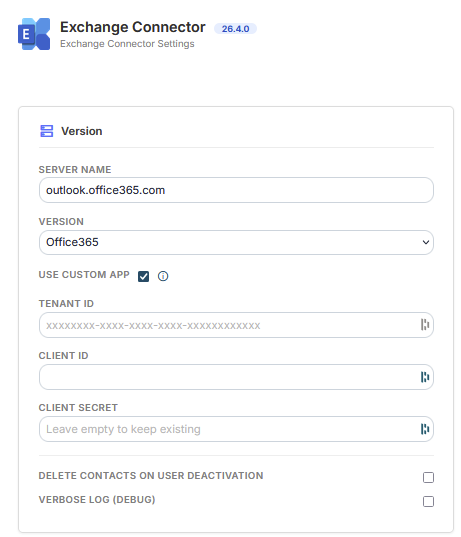
Use this option when the customer wants to manage the application directly in their Microsoft tenant, for example for specific security, governance or corporate policy requirements.
Enter:
- **Tenant ID**;
- **Client ID**;
- **Client Secret**.
The Microsoft application must use the vtenext redirect URI:
`https://YOUR-VTENEXT/modules/Exchange/oAuth2/AuthorizationCode.php`
Replace `https://YOUR-VTENEXT` with the actual CRM address.
[](https://manual.vtenext.ch/uploads/images/gallery/2026-09/JIccIEwnoHeRYnMe-immagine.png)
## Required permissions
The application must allow users to authorize access to Calendar, Contacts, Tasks / To Do and offline access required to renew the session.
Authorization is delegated to each individual user: every user connects their own Microsoft account.
## Changing the connection method
**Reauthorization required**
When switching from **vtenext Proxy** to **Custom Microsoft App**, or vice versa, existing Microsoft user connections must be authorized again.
After changing the mode, save the configuration, reconnect users with **Connect**, verify their folders and run a synchronization test.
**Do not change the mode directly in production**
Plan user reauthorization and validation tests before making the change.