
Events, Recurrences and Online Meetings
Calendar synchronization keeps events aligned between vtenext and Exchange when Event synchronization is enabled.
Creating and editing events
An event created or edited in vtenext is sent to the user's Exchange calendar. Changes made in Exchange can also be synchronized back to vtenext.
For testing, use clearly identifiable events, for example TEST EXCHANGE - DO NOT USE.
Deletions
The connector manages deletions, but test this behavior first with a dedicated test event. Do not use a real appointment as the first deletion test.
Recurring events
The connector also handles recurring events. For series without an end date, vtenext progressively maintains the future occurrences required for synchronization.
After migration or a major configuration change, test at least a weekly series, a change to the series and, if used, a change to a single occurrence.
Microsoft 365 and Microsoft Teams meetings
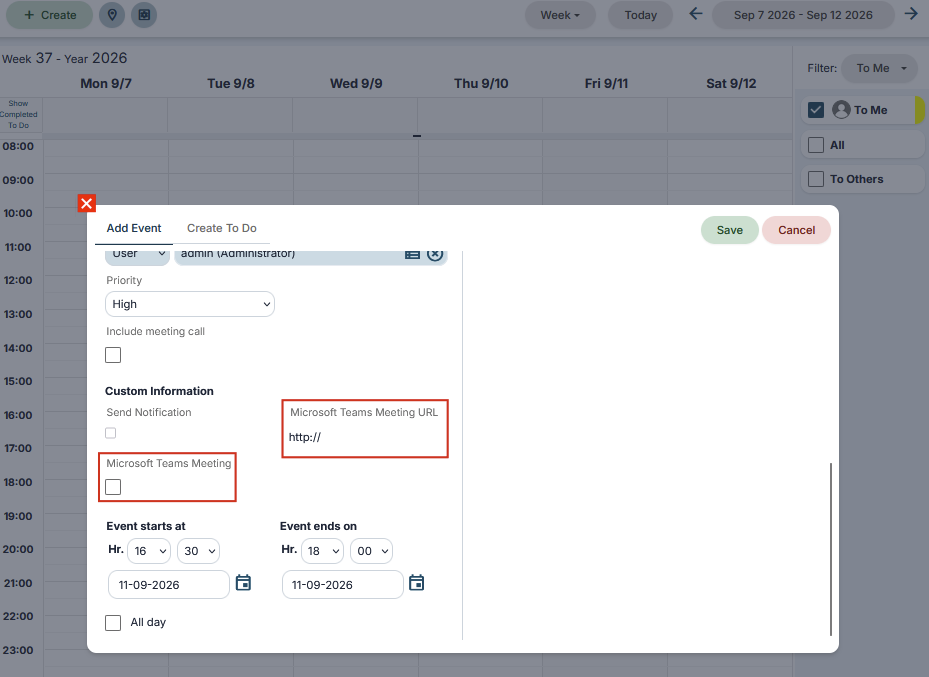
In the new Exchange Connector versions, when Microsoft 365 / Exchange Online is used, an event can be created and managed as a Microsoft Teams online meeting and the related Teams link can be used directly from the synchronized event.
This feature is available with Microsoft 365 through Microsoft Graph. It is not available with on-premises Exchange Server through EWS.
When Teams is used, verify that the event is created correctly, that the Teams link is generated and available where expected, and that editing the event does not remove the online meeting link.
If an event appears duplicated
Before deleting one of the events, check whether the user was recently reconnected, synchronization folders were changed, an EWS-to-Graph migration just took place, or bulk imports/changes were performed. Do not keep creating additional test events until the cause is understood.