
Opening and Configuring Exchange Connector
Global configuration is available under Settings > Exchange Connector.
From this page, the administrator selects the Exchange type and chooses which data should be synchronized.
Connectivity requirements
With Exchange Server/EWS, it is enough for the vtenext server to reach Exchange: vtenext opens and maintains the streaming connection, so the CRM does not need to be publicly reachable from the Internet. With Microsoft 365/Graph, the vtenext endpoint must be reachable by Microsoft servers in order to receive push notifications.
If Microsoft 365/Graph is used and vtenext cannot be published or reached from the Internet, standard inbound notifications cannot work correctly. A cron-based synchronization can be set up manually, but it is a custom configuration, is not available as a self-service option and is strongly discouraged compared with the standard push-notification architecture.
License activation
If the connector is not yet active, enter the license key and click Verify. Once validated, the full configuration becomes available.
Main settings
- Exchange Version;
- Events synchronization;
- Contacts synchronization;
- Tasks synchronization;
- Organizations synchronization;
- optional deletion of Contacts for inactive users;
- Microsoft 365 connection mode when Office365 is used.
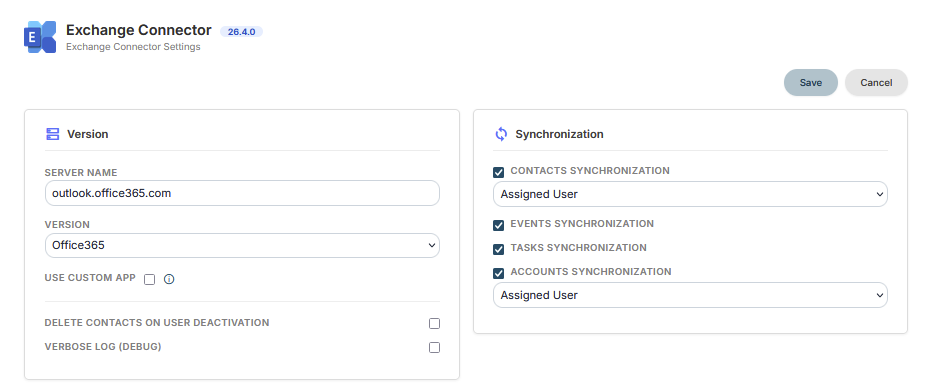
Selecting the Exchange version
- Office365 for Microsoft 365 / Exchange Online;
- Exchange 2016;
- Exchange 2019;
- Exchange SE for Exchange Server Subscription Edition.
The selected version determines the connection method used by the connector.
Before saving
Verify that the Exchange type is correct and enable only the functions that should actually be synchronized. After saving, continue with user configuration.